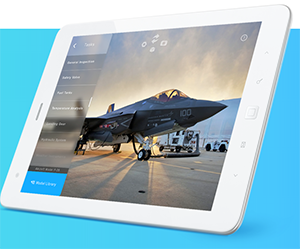
 NGRAIN today announced the availability of NGRAIN Viewer for Android, a new app for Android tablets and smart glass devices, enabling the deployment of industrial 3D content created with NGRAIN Producer Pro.
NGRAIN Viewer for Android offers organizations working with heavy equipment, assemblies, and other industrial assets in the field, the opportunity to easily explore possible use cases for smart glasses and 3D content without the need to invest in the development of a mobile 3D app. NGRAIN is further making Viewer for Android open source, offering R&D teams and developers an excellent starting point to customize and create their own industrial applications.
With NGRAIN Viewer for Android, NGRAIN provides the source code to bootstrap a 3D app for Android, load 3D content, view animations, play step-by-step tasks, and interact with content from NGRAIN Producer Pro. Developers can then quickly develop a customized 3D industrial app for Android by modifying and extending the NGRAIN source code. Using NGRAIN Producer Pro, organizations can rapidly create 3D content for these custom apps without the need for expertise in 3D graphics, custom scripting, or further programming.
“Smart glasses are creating opportunities for businesses to connect their employees in the field with access to the right information at the right time, and NGRAIN Viewer for Android, coupled with NGRAIN Producer Pro, is providing the best way for these organizations to experience this potential first-hand, enabling the creation and deployment of 3D industrial apps at a fraction of the cost and time of an outsourced, custom solution,” said Barry Po, Senior Director, Product and Business Development of NGRAIN.
NGRAIN is proud to be partnered with Epson in delivering an optimized experience for the Epson® Moverio® BT-200 and BT-300 smart eyewear. “The largest barrier to augmented reality (AR) for smart glasses is the cost of content creation, since the cost of creating step-by-step 3D models and AR content is too expensive to be practical for a lot of applications,” said Eric Mizufuka, product manager, New Ventures for Epson America. “What’s great about the NGRAIN Viewer for Android is it dramatically lowers the cost, while maintaining the quality of these high-end content experiences for AR glasses. This type of next-gen product is a critical part to helping the AR glasses ecosystem mature to mainstream adoption.”
Launching its first-generation smart glasses in 2011, Epson recently announced the Moverio BT-300, the world’s lightest binocular, transparent smart glasses with an OLED display. Combining breakthrough silicon-based OLED digital display technology, the Intel Atom processor, and Android OS 5.1, the Moverio BT-300 enables a truly transparent mobile AR experiences for organizations. The Epson Moverio BT-300 will be available in late 2016 and may be pre-ordered at Epson.com/Moverio. For a complete product overview of the Moverio BT-300, please visit the following link.
NGRAIN Viewer for Android supports any Android device with a minimum API Level 15 (Android 4.0.3). Tools are available to convert existing 3D assets with virtually every major 3D CAD/DCC format including Inventor, CATIA, Parasolid, Pro/E, Rhino, SolidWorks, STEP, DXF, OBJ, DWH, STL, and more, for use with NGRAIN Producer Pro and the NGRAIN Viewer for Android.
The NGRAIN Viewer for Android is free for download via the NGRAIN Web site.

Leave a Reply