Microcontroller units (MCUs) are single-chip computers optimized for performing embedded computing tasks like controlling a coffee machine or a medical device, an industrial robot, or an electric vehicle battery charger. They don’t require a complex operating system (OS) like those found on personal computers and servers.
The central processing unit (CPU) is a key element that executes the MCU’s program. Other components in an MCU include random access memory (RAM) for temporary data storage while the device is powered up, read only memory (ROM) like Flash or EEPROM that can store the program and other data even when the device is off, plus various input/output (I/O) and serial ports, timers to coordinate program execution and communication and an interface to external control signals (interrupts).
The oscillator (OSC) performs timer operation for the digital circuit. The faster the oscillator, the higher the MCU’s performance (Figure 1).

How it works
An MCU receives input signals from sources like a user interface or sensors. The programmed instructions in the ROM are used to interpret the signal and translate it into specific commands needed to perform a function like charging a battery or making a cup of coffee.
The system can also include feedback from sensors, enabling the process to be adjusted based on specific factors like the temperature or, in the case of battery charging, the state of charge of the battery.
The bus controller manages data flow and communication between different components within the MCU and with external devices, ensuring efficient operation by directing data to the correct destinations and managing multiple devices to access the shared bus. The serial port enables communication with other MCUs, computers, and peripherals like sensors and displays.
Basic features
When selecting an MCU, there are several basic features to consider, including the computing architecture, data bus width, type of instruction set, and application-specific requirements (Figure 2).
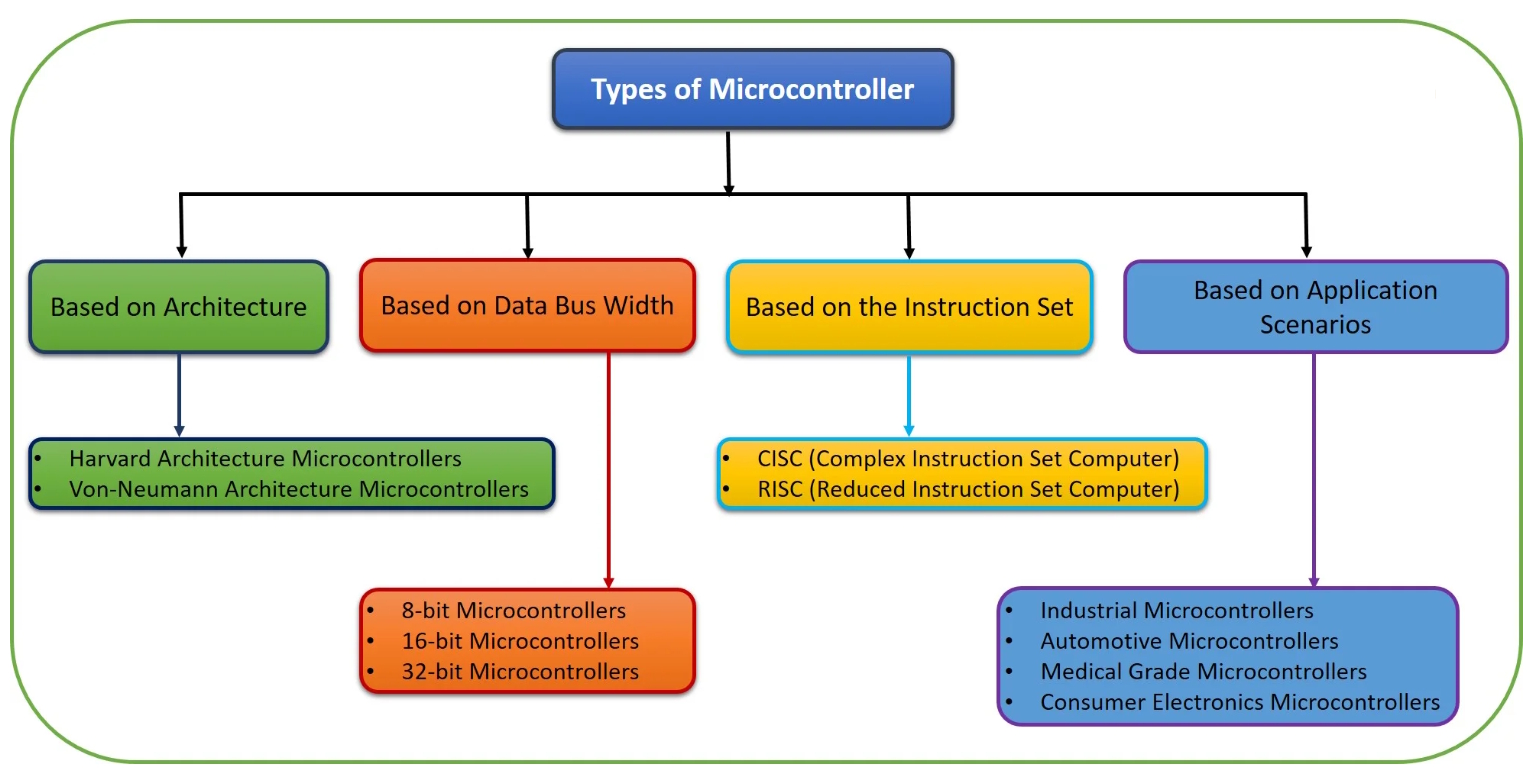
MCUs predominantly use a Harvard architecture with separate buses for instructions and data, allowing for simultaneous fetching and execution to increase speed and efficiency. The Von Neumann architecture has a single memory space and a single bus for both program instructions and data. It’s more common in general-purpose devices, like smartphones, where the flexibility to treat instructions as data can be useful.
MCUs are commonly available with bus widths of 8, 16, and 32 bits. The best bus width is based on application requirements for processing speed, memory size, and cost goals. Wider 64-bit buses are available on high-performance MCUs used in artificial intelligence, industrial automation, robotics, and automotive systems.
MCUs are available that use reduced instruction set computing (RISC) and complex instruction set computing (CISC). MCUs using RISC architecture tend to be lower power with reduced heat dissipation. MCUs using CISC architecture have a higher code density, are more memory efficient, and can be more versatile.
Application-specific considerations include factors like automotive qualifications and automotive-specific communication interfaces like CAN, LIN, and FlexRay. Medical-grade devices meet standards like ISO 13485 and FDA guidelines. Industrial MCUs rated for operation in harsh environments with extended operating temperature ranges. Consumer devices with support for Bluetooth, Wi-Fi, and other wireless networking protocols.
More factors
Some applications can benefit from using MCUs with integrated analog components like analog-to-digital (ADC) and digital-to-analog (DAC) converters that support direct connection with analog devices like sensors.
Security is an increasingly important consideration, and MCUs are available with integrated encryption engines and other security capabilities.
The availability of a mature development ecosystem can significantly impact time to market and cost. Factors to consider include:
- Software and driver availability, like hardware abstraction libraries (HALs), communication stacks like TCP/IP and USB, pulse width modulation drivers, and various motor control software options.
- A comprehensive integrated development environment (IDE) with an editor, compiler, and debugger can speed the development process, and a cloud-based IDE can support dispersed teams and collaborative projects.
- Evaluation and development boards can support rapid prototyping and testing new hardware configurations.
Summary
An MCU is a complete computer system including the CPU, memory, and a variety of I/O ports. They are optimized for embedded computing and control tasks in applications like consumer devices, automotive systems, medical electronics, industrial control, and so on. Key performance criteria include the width of the data bus and the speed of the internal oscillator.
References
32 Bit Microcontroller: A Beginner’s Guide, Cadence
A Complete Guide to Microcontrollers, RS Components
Embedded Systems: a brief guide about Microcontroller Programming Tools, SMH Technologies
Getting Started with Arduino: A Beginner’s Guide for Kids, STEM Adventures
Getting Started with Microcontrollers: A Beginner’s Guide to MCUs, Programming, and Applications, Kynix
How to Connect, Read, and Process Sensor Data on Microcontrollers – A Beginner’s Guide, freeCodeCamp
Microcontrollers: The Basics, NYU
Understanding the basic difference between microcontroller and microprocessor, Arduino
What is a microcontroller?, IBM
Related EE World content
What’s the difference between GPUs and TPUs for AI processing?
RISC-V vs. ARM vs. x86 – What’s the difference?
Exceptions, traps, and interrupts, what’s the difference?
What’s special about embedded microcontrollers?
What’s the difference between Von-Neumann and Harvard architectures?





Leave a Reply