The first production vehicle to employ a Bluetooth (actually a BLE) digital key is Tesla’s Model 3. When the owner approaches carrying his or her smartphone equipped with Bluetooth, Model 3s can be set to unlock their doors and trunk automatically, and starting the Model 3 is as simple as shifting out of Park.
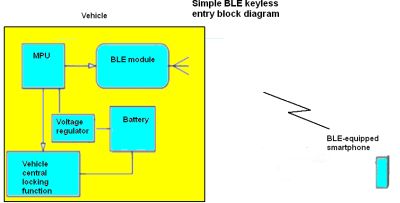
For example, CR testers found the Model 3’s virtual key doesn’t work unless the smartphone is turned on and the Tesla app is open and active. CR reports its testers occasionally found themselves unable to open the Model 3’s door when they had closed the app.
Tesla’s use of digital keys shows how the industry may handle scenarios such as how to open the car door when your smartphone battery dies. Tesla provides Model 3 owners with a backup keycard that can also be used when the car is valet parked. To lock or unlock the car, a driver must swipe the keycard along the pillar next to the driver’s seat. Because the Model 3 doesn’t come with a traditional ignition switch or push-button start, drivers must also tap the key behind the front-seat cup holders to “start” the car.
The process sounds a bit kludgy. And it explains why many observers expect most cars with digital keys to still come with key fobs for the foreseeable future.
Experience with the Tesla implementation also indicates there are range issues to be worked out before digital keys go mainstream. Traditional RF keyless entry fobs generally must be inside the vehicle before the car will start. CR testers found they could start a Model 3 when the phone with the digital key app was five feet outside the driver’s door. They were also able to drive the car away without the phone being inside.
A few other carmakers are beginning to roll out digital keys. The Lincoln Aviator now has an app that will unlock the SUV and stores driver profiles for comfort settings. The European version of the Mercedes-Benz E-Class and the European version of the 2019 Audi A6 both have phone-based digital keys, but both systems use near field communication (NFC) to operate.
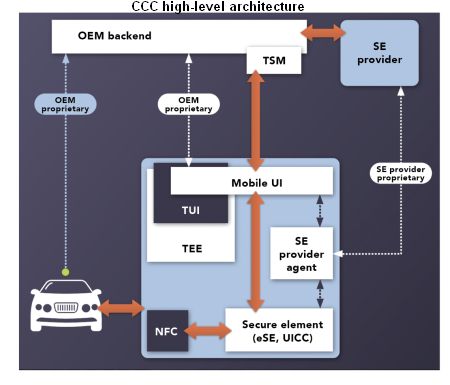
CCC is also working on a 2.0 specification due out this year. It will spell out a standard authentication protocol between the vehicle and smart device. It is being developed in collaboration with CCC charter member companies that include Apple, Audi, BMW, General Motors, Hyundai, LG Electronics, Panasonic, Samsung, and Volkswagen, and core members Alps Electric, Continental Automotive GmbH, Denso, Gemalto, NXP, and Qualcomm Inc.




Leave a Reply