
A Virtual Machine (VM) is a machine that runs on another machine. Virtual machines can be used to run several different operating systems on the same computer hardware. For example, a computer (“machine”) running Linux can have a VM installed on it that is running Windows and for all intents and purposes, the Windows machine doesn’t know that it has a Linux operating system (OS) between it and the CPU. Cloud infrastructures use virtual machines to optimize hardware resources, isolate applications, and create a flexible operating environment for dynamic allocation of resources. However, virtualization comes with a burden on computer resources because VMs support entire OSes, and there is a duplication of effort, so to speak, with multiple OSes running on a single physical computer. VMs were introduced in the 1960s and have become widely used in data centers to avoid having to have an actual, physical dedicated server for each customer environment, for example. One physical server’s resources could be quite underutilized with just one customer’s database and web server, for instance. Virtualization allows several environments to run on one server, or even across several servers, using resources as they require them.
Data centers running VMs use something called a hypervisor that runs on the stack below the VM. The hypervisor manages all of the VMs. A hypervisor is a portion of computer software that creates, runs, deletes, and monitors virtual machines. Estimates put computing’s use of the total world energy at 10%.[i] VMs improve efficiency, but VMs are also more than is necessary at times. People use the terms “virtual machine” and “virtualization” synonymously, but a less resource-intensive instance of virtualization is available, and is called a “container.” Containers also allow virtualization, but have less overhead, offer a more efficient means to juggle resources, and can have a significant impact on lowering energy consumption in data centers.
Containers are virtualized isolated, user space instances at the operating system level and have been in existence for years under different names. For example, FreeBSD “Jails” are essentially operating system-level instances of virtualization. A container is like a portion of a VM but is not a full VM and does not have the overhead of a VM. Containers provide one or several user space instances with the ability to see processes, the user space, and the file system.
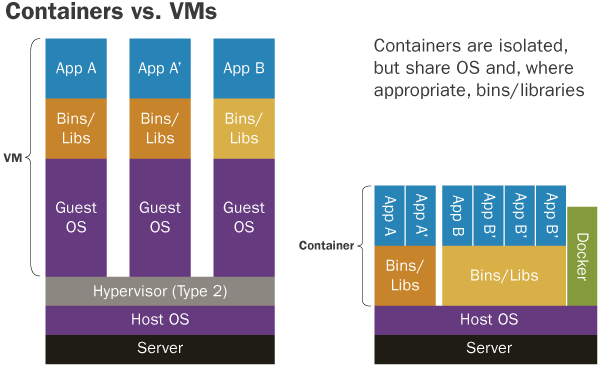
Virtual machines allow a full OS installation, and thus VMs will demand more resources than containers. Nevertheless, both containers and VMs use an operating system. However, whereas you can install a VMs on any underlying operating system, you can only install containers installed on an OS that is similar to itself. For example, a Linux container can only run on a Linux OS. A Linux container shares the Linux kernel with the computer that is hosting it, rather than dissimilar OSes such as what is possible when using VMs. Containers do not require a hypervisor; they have a container engine. An example of a container engine is Docker or Rocket. The Docker tool creates, runs, manages Linux containers.
Since VMs run a full OS, the duration of time to startup and shutdown is similar to that of a natural OS. Containers have less overhead since they share the kernel with the host OS, and as a byproduct of sharing the host’s kernel, containers can start and stop very rapidly. Containers can start and stop very quickly for a dynamic cloud-based environment, for example, and containers have a smaller footprint than virtual machines. Docker containers can only run on Linux distributions and cannot run Windows processes. Docker containers will incorporate the dependencies of their “containerized” applications. Implementing Docker containers allows a consistent deployment regardless of what’s running in the container. This is convenient for application deployment since Docker bundles the application with its system dependencies; thus an image will run consistently across environments. Docker has been available since 2013 under the Apache License 2.0.
[i] Mills, Mark P. “The Cloud Begins with Coal.” (2013): n. pag. Web. 28 Jan. 2017.

Leave a Reply